1. 開始-->輸入CMD開命令提示字元-->輸入netstat -nao
找出佔用Port的PID
netstat : 顯示TCP/IP網路連線與每一種協定的統計資料
-a : 列出所有連線中或listening的連線
-n : 使用IP Address(以數字列出位址),而不是使用名稱伺服器
1. 開始-->輸入CMD開命令提示字元-->輸入netstat -nao
找出佔用Port的PID
netstat : 顯示TCP/IP網路連線與每一種協定的統計資料
-a : 列出所有連線中或listening的連線
-n : 使用IP Address(以數字列出位址),而不是使用名稱伺服器
處理編碼問題時在server.xml加上URIEncoding="UTF-8",重啟SERVER後卻自動還原
原因是Tomcat在Eclipse中啟動時會自動發佈Eclipse中佈署的項目。
我們是在外面修改的,Eclipse不會同步文件,所以Eclipse會建立一個新的server.xml來覆蓋原來的文件。
方法1 :
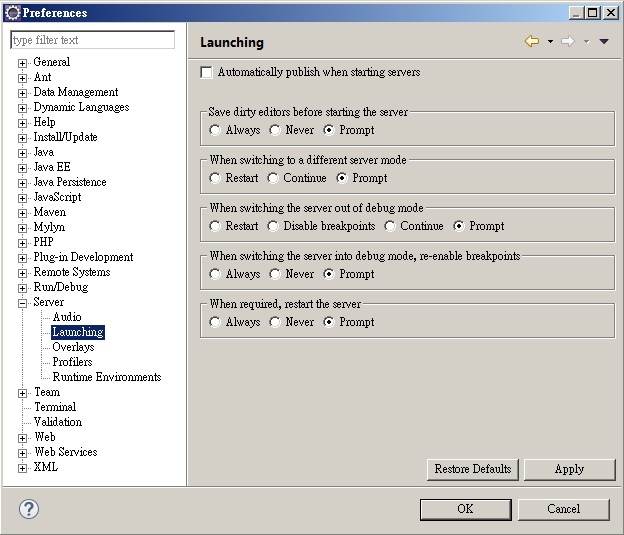
Window--> Preferences--> Server--> Launching
將Automatically publish wen starting servers取消選取
CSS 中的 Z-index 用於設置節點的堆疊順序,數字越大的在越上面
範例:

<style type="text/css">
#p1{
position:absolute;
top:10px;
left:10px;
width:100px;
height:100px;
background-color:#00dc03;
z-index:1;
}
#p2{
position:absolute;
top:30px;
left:30px;
width:100px;
height:100px;
background-color:#fdff55;
z-index:2;
}
</style>
<div id="p1">
<span class="p1">z-index:1</span></div>
<div id="p2">
<span class="p2">z-index:2</span></div>
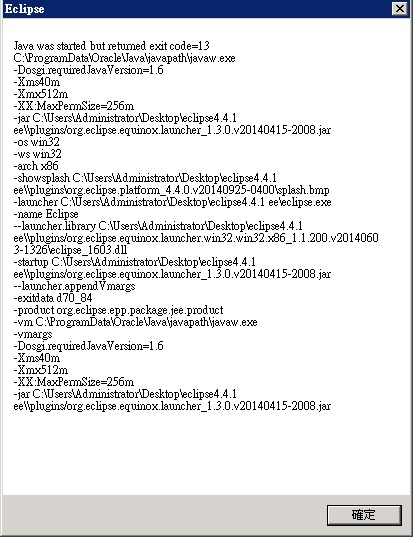
eclipse打不開,出現錯誤訊息java was started but returned exit code=13
原因是eclipse混淆32bit跟64bit的路徑
解決方法 :
